Worship Backing Tracks
- 4.7
- Rating
- 100.00K
- Installs
- Free
- Price

 Analysis by App-foxy
Worship Backing Tracks caught my attention because it addresses a very specific need: having musical support available when a worship team does not have every instrument, musician, or rehearsal resource on hand. I spent time looking at how it fits into real worship preparation rather than treating it as just another music player. My overall impression is that it can become a useful part of a church musician’s routine, but its lasting value depends on whether the available tracks match your congregation’s style and whether you are comfortable building your own workflow around backing audio.
This is a free Music & Audio app from XME Inc., aimed at people who want gospel-oriented accompaniment for worship. It has reached over 100 thousand installs and holds a 4.7 average from roughly 1.5 thousand ratings, which suggests that the idea is connecting with its intended audience. The age rating is Everyone, so it is approachable for church volunteers, worship leaders, singers, and musicians across a wide range of ages.
Why the first week feels useful
The strongest first impression is its focus. Many music apps are built around listening, discovery, playlists, or streaming. This one is more practical: it is meant to support worship rather than simply fill silence. That difference matters when I am preparing a song, practicing a vocal part, or trying to create a fuller sound without assembling a complete band.
You May Also Like

 Pandora - Music & Podcasts
Pandora’s Music Is Easy to Start, but Harder to Recover
Pandora’s strength is its low-effort path from a seed to a station. Its weak spot is how much confidence it asks you to place in connection, setup, and quiet recovery.

 AccuWeather: Weather Radar
AccuWeather Review: A Quick, Clear Forecast for Everyday Decisions
For everyday plans, the best forecast is the one you can understand quickly. AccuWeather makes rain timing, radar, and local conditions easy to act on, with a few trade-offs.

 Hill Climb Racing
Why Hill Climb Racing Still Turns Crashes Into One More Run
A tiny car, a bumpy hill and one more upgrade: Hill Climb Racing keeps resurfacing because its simple chaos makes every near-miss feel personal.

 AliExpress - Shopping App
AliExpress Makes Global Shopping Feel Personal, but Shoppers Bear the Risk
AliExpress turns a global marketplace into a pocket-sized discovery engine. Its reach is useful, its shopping loop compelling, and its trade-offs easy to miss.

 Lords Mobile: Kingdom Wars
Lords Mobile Is a Kingdom-Building Routine, Not a Quick Match
A case-by-case verdict on the building, battles, device demands, and social commitments that make Lords Mobile rewarding for some players and exhausting for others.

 PDF Scanner app - TapScanner
TapScanner Makes Paperwork Easier to Capture, Check, and Share
TapScanner makes scanning with a phone feel less like a rescue operation and more like a dependable step in getting work done. Its capture tools are useful, though not flawless.
More From Our News Desk
View All News


During the first week, an app like this can quickly become part of several routines. I can imagine a worship leader using a track while checking the key and arrangement of a song, a vocalist rehearsing with more musical context than a bare instrumental exercise provides, or a small church using accompaniment during a service where only one or two musicians are available. The value is immediate because the app is connected to a real task, not just casual listening.
The gospel and worship focus is also more helpful than a broad backing-track catalog would be for the right user. Instead of sorting through unrelated genres, I can approach the app with a clear purpose. That makes it easier to decide whether it belongs in my toolkit. If my regular work involves worship songs and church rehearsals, the concept is naturally relevant. If I mainly need pop, rock, jazz, or general karaoke accompaniment, the narrow focus becomes a limitation from the beginning.
I would not treat the app as a replacement for a worship team. A backing track can provide structure and musical fullness, but it does not react to a congregation, extend a chorus spontaneously, change dynamics in response to a leader, or recover gracefully when a singer misses a line. In my experience, that makes the app most useful when the arrangement is planned in advance and everyone understands that the recording will guide the performance.
A realistic first-week scenario would be a small Sunday team preparing for a service with a guitarist and a vocalist but no drummer or keyboard player. The guitarist can rehearse against the track, the singer can work on entrances and phrasing, and the team can decide whether the recorded accompaniment supports the song without overwhelming the live parts. That is a more convincing use than simply pressing play and expecting the app to manage the entire service.
The free price lowers the barrier to trying it. I can explore whether the concept fits my church before committing money, which is important for volunteer-led groups with limited budgets. At the same time, the presence of in-app purchases ranging from $9.99 to $399.99 per item means the free starting point should not be confused with an entirely cost-free long-term setup. I would first test the workflow with the material available to me, then discuss purchases with the people responsible for the church’s music budget.
What to check before relying on it publicly
My first practical recommendation is to rehearse with the exact track you expect to use, in the same room and through the same kind of sound system if possible. A track that feels balanced through headphones may behave very differently through a church speaker. Drums, bass, or dense accompaniment can mask a vocalist in a reflective room, while a sparse arrangement may feel exposed when the congregation is singing.
I would also make a simple backup plan. A phone or tablet can run out of battery, lose access to its content, or become distracting when notifications appear. Even if the app works perfectly, a service should not depend on a single device without preparation. Keeping the song order written down and knowing what happens if a track cannot start will make the experience calmer for everyone involved.
Another useful first-week test is to ask whether the track supports the leader’s natural tempo. Some worship leaders prefer flexible pacing, extra repetitions, or a quiet moment before the final chorus. A fixed recording may not accommodate those choices. If your church regularly changes arrangements during worship, use the app mainly for rehearsal or for songs with a predictable structure rather than forcing every service into the shape of the recording.
How the value changes after the novelty
The first-week appeal comes from solving an obvious gap. The month-to-month question is harder: will I still open it after the initial excitement fades? My answer is conditional but positive. It can earn lasting space when it becomes part of a repeatable preparation system instead of an app I remember only when a musician cancels.
For recurring value, I would organize my use around three habits. First, I would select tracks during the planning stage, not five minutes before a service. Second, I would rehearse transitions between live playing and recorded accompaniment. Third, I would keep notes about which songs work well in my particular room and with my particular team. Those notes turn a collection of tracks into a practical resource rather than a pile of possibilities.
This is where the app can be more valuable than a normal music-streaming service. Streaming platforms are excellent for discovering recordings and hearing how songs sound, but they are not necessarily designed for controlled worship support. A regular recording may have lead vocals, a structure that is difficult to follow, or a production style that does not leave space for a live singer. Worship Backing Tracks is more directly aligned with accompaniment, so it can reduce the gap between listening and performing.
It also compares differently with hiring additional musicians. Live players offer responsiveness and human timing, which a recording cannot reproduce. However, they require availability, rehearsal coordination, and sometimes equipment that a small church does not have. The app is easier to repeat from week to week, while a live team is more adaptable. I see it as a practical supplement when resources are limited, not as a universal substitute for people.
Compared with generic karaoke applications, the worship focus is the important distinction. Karaoke services often prioritize entertainment and a large variety of songs. A worship leader usually cares more about suitability, atmosphere, and whether the accompaniment leaves room for congregational singing. A smaller, more focused tool can be preferable if its material fits the songs your church actually uses.
On the other hand, a dedicated digital audio workstation or a collection of professionally prepared tracks may be better for advanced teams. Those options can provide deeper control over arrangement, routing, editing, and live transitions, but they also demand more technical knowledge and preparation. This app makes more sense for someone who wants usable accompaniment without turning worship planning into a production project.
Three workflows that make it more useful
The first workflow is rehearsal separation. Instead of using the track only from beginning to end, I would practice specific moments: the opening cue, the first vocal entrance, the move into the chorus, and the ending. This exposes timing problems early. It is especially helpful when a singer is learning where to enter against an instrumental introduction.
The second is arrangement matching. Before choosing a track for a service, I would compare its emotional shape with the way the congregation usually sings. A powerful recorded build may be appropriate for a celebratory song but too heavy for a reflective moment. The best choice is not always the fullest or most impressive accompaniment; it is the one that gives the live voice and congregation enough room.
The third is role assignment. Someone should know who starts the track, who controls volume, and who stops playback if the service changes direction. This sounds basic, but it is one of the easiest ways for a useful app to become a source of distraction. Treating playback as a small part of the worship team’s responsibilities makes the technology less visible.
These workflows also answer an important question about suitability for beginners. Yes, a beginner can use the app, but pressing play is not the whole job. The user still needs to understand the song’s structure, listen critically to the balance, and communicate with the people singing or playing live. Someone willing to do that preparation can gain a lot from a simple accompaniment tool.
Maintenance is light, but the musical preparation is not
The app itself appears easy to justify as a low-maintenance addition because it is free to install and supports a clear purpose. Its current version is 1.1.22 and it requires Android 6.0 or later, so anyone checking compatibility should confirm that the device used for worship meets that requirement. The more significant maintenance burden is not technical upkeep; it is keeping the song choices, device setup, and team expectations organized.
I would avoid making one person the only person who knows how to operate it. A worship leader may be absent, a volunteer may change, or a service may need to be covered by someone else. Showing at least one additional person the playback routine creates resilience. It is also worth testing the device before each important service, particularly if the app has not been opened for a while.
Purchases deserve a little planning as well. Because individual in-app items can range from $9.99 to $399.99, I would not treat every attractive addition as an automatic buy. A church could easily spend more than intended if several people purchase items independently. A shared list of priority songs and one agreed purchasing process would make the cost easier to control.
I would also ask whether a track will be used repeatedly before paying for it. A song needed for one special occasion may not offer the same value as a track that supports rehearsal and services throughout the year. The purchase decision should be based on recurring usefulness, not only on how exciting the arrangement sounds during the first listen.
Where fatigue can set in
The main source of fatigue is repetition. If the same backing arrangements appear too often, the sound can begin to feel predictable. That matters in worship because congregations respond not only to the song itself but also to pacing, dynamics, and the sense that the moment is being led rather than played back. Rotating between live accompaniment, unaccompanied singing, and recorded support can keep the app from becoming the default texture for everything.
Another frustration is the loss of flexibility. A live musician can follow a leader who repeats a chorus, shortens an introduction, or pauses for prayer. A fixed track generally expects the performance to follow its timeline. If your worship style depends on spontaneous changes, you may spend more energy working around the recording than you save by using it.
There is also a risk of choosing a track because it sounds polished rather than because it serves the room. A large production can make a rehearsal feel impressive through headphones but may dominate a small space. I would make the final decision after hearing it with the live vocalist and, if possible, with the congregation’s likely singing volume in mind.
The app is not the right choice for someone seeking a broad music library, a social listening experience, or advanced arrangement control. It is also a weak fit for a team that already has dependable musicians and values constant improvisation. In those situations, a normal music service, live players, or more advanced audio software may be more appropriate.
Privacy and distraction are practical considerations for any mobile tool used in a service, but I would focus on behavior rather than assumptions. Use a dedicated device when available, silence interruptions, and avoid changing settings during the service unless necessary. The less attention the phone receives, the more naturally the accompaniment can support the people in the room.
Who is most likely to keep using it?
I can recommend it most confidently to small churches, volunteer worship teams, solo singers, and musicians who need gospel backing without building a full band for every gathering. It is also useful for personal practice when a singer wants to work on confidence, phrasing, and timing with more musical support than a metronome provides.
It may suit a church that alternates between full-band Sundays and simpler services. On a week with fewer musicians, the app can help maintain continuity without pretending that the lineup is unchanged. The key is to use it intentionally: let it fill a specific musical gap, then reduce it when live resources are available.
I would be more cautious recommending it to a large, highly flexible worship production. Such a team may need synchronized cues, live arrangement changes, detailed monitoring, and precise control that a focused backing-track app may not provide. In that environment, a professional playback system or live band may justify its extra complexity.
My long-term verdict
Worship Backing Tracks earns a place on my recommended list for the right kind of worship musician. Its appeal is not that it can do everything; it is that it addresses one recurring problem with a focused approach. The free entry point makes experimentation easy, and the strong user response gives me confidence that many people find the concept worthwhile.
Still, I would judge it by how often it improves preparation and services after the first month. If I use it to rehearse entrances, support a small team, and cover predictable accompaniment needs, it has durable value. If I play it automatically for every song, ignore the room’s acoustics, or expect it to follow spontaneous leadership, the novelty will fade quickly and the limitations will become obvious.
My advice is to start small, test a few realistic worship situations, and evaluate the result with the singers and musicians who will actually use it. Keep track of which arrangements help, which feel too rigid, and which purchases would be used repeatedly. That approach protects the budget and keeps the technology in its proper role.
For me, the final judgment is favorable but specific: this is a practical accompaniment tool, not a complete worship solution. It deserves lasting space when your church needs dependable gospel support and is willing to prepare around recorded structure. If flexibility, improvisation, or a broad music catalog matters more, another option will serve you better. Used with clear expectations, however, it can quietly become one of those modest tools that saves preparation time and makes a small team feel musically supported.
FAQs for Worship Backing Tracks
01What is Worship Backing Tracks?
Worship Backing Tracks is a music app designed to support church worship teams, singers, and musicians with professionally arranged accompaniment tracks. It can help fill out a live performance when certain instruments or vocal parts are unavailable. Depending on the selected song and available version, users may find tracks for different keys, arrangements, tempos, and performance settings.
02Can I change the key or tempo of a backing track?
Many worship backing-track services provide practical control options such as choosing a suitable key, adjusting the tempo, or selecting different arrangements. These features are especially useful when a vocalist needs a more comfortable range or when a worship leader wants to match the congregation’s pace. However, available controls can vary by song, subscription plan, and platform.
03Does Worship Backing Tracks work without an internet connection?
Offline use depends on the specific app version, account type, and whether the selected tracks can be downloaded for later playback. If offline access is supported, downloading songs before a service is strongly recommended because it reduces the risk of interruptions caused by weak Wi-Fi or mobile data. Users should test downloaded tracks before relying on them during worship.
04Is Worship Backing Tracks suitable for church services and live performances?
The app can be useful for church services, rehearsals, small worship groups, solo performers, and live events that need additional musical support. Before using it publicly, check the audio output, track timing, transitions, and compatibility with your sound system. It is also important to confirm that your chosen songs and arrangements fit your church’s worship style and performance requirements.
05Is Worship Backing Tracks free to use?
The availability of free content, previews, downloads, and premium features may depend on the current pricing model and the user’s platform. Some tracks or basic functions may be accessible without payment, while larger libraries, advanced controls, or performance-ready downloads may require a purchase or subscription. Review the in-app pricing, renewal terms, and licensing conditions before subscribing.
Pros
- Large library of worship songs for rehearsals
- services
- and personal practice.
- Multiple instrument and vocal options make tracks easier to customize.
- Useful tempo and key controls support different singers and worship teams.
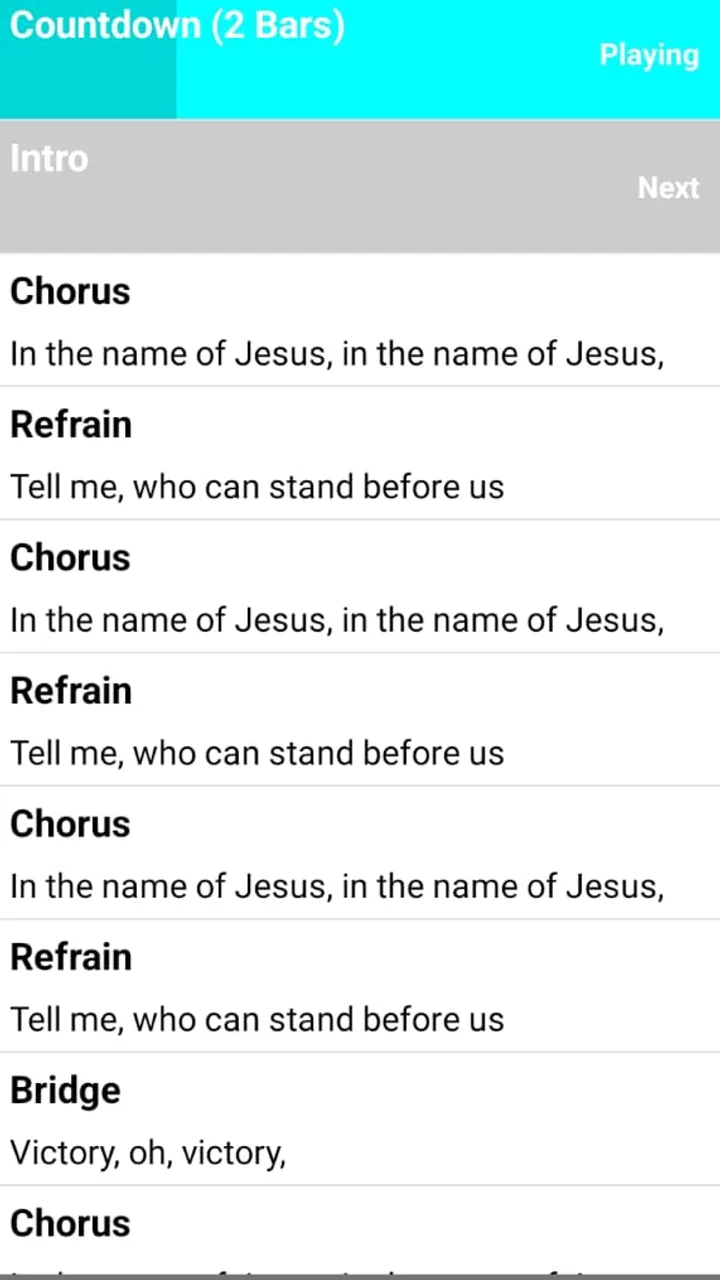
- Clean playback interface helps users find and start songs quickly.
- Can provide a fuller sound when a church lacks a complete live band.
Cons
- Some tracks or features may require a paid subscription or in-app purchase.
- Song availability can vary by denomination
- language
- and worship style.
- Audio quality may differ between older and recently added backing tracks.
- Needs enough storage and a stable connection for downloading large audio files.
- Tracks may not match every church’s preferred arrangement or song tempo.

Worship Backing Tracks
Gallery